
书单推荐:成为Java顶级程序员架构师 ,这20来本(高薪)必看点击获取
通过使用Spring Boot应用程序,可以创建一个war文件以部署到Web服务器中。在本章中,将学习如何创建WAR文件并在Tomcat Web服务器中部署Spring Boot应用程序。
Spring Boot Servlet初始化程序
传统的部署方式是使Spring Boot应用程序@SpringBootApplication类扩展SpringBootServletInitializer类。 SpringBootServletInitializer类文件允许在使用Servlet容器启动时配置应用程序。
下面给出了用于JAR文件部署的Spring Boot应用程序类文件的代码 -
package com.yiibai.demo;import org.springframework.boot.SpringApplication;import org.springframework.boot.autoconfigure.SpringBootApplication;@SpringBootApplicationpublic class DemoApplication {
   public static void main(String[] args) {
      SpringApplication.run(DemoApplication.class, args);
}}Java需要扩展类SpringBootServletInitializer以支持WAR文件部署。 Spring Boot应用程序类文件的代码如下 -
package com.yiibai.demo;import org.springframework.boot.SpringApplication;import org.springframework.boot.autoconfigure.SpringBootApplication;import org.springframework.boot.builder.SpringApplicationBuilder;import org.springframework.boot.web.support.SpringBootServletInitializer;@SpringBootApplicationpublic class DemoApplication  extends SpringBootServletInitializer {
   @Override
   protected SpringApplicationBuilder configure(SpringApplicationBuilder application) {
      return application.sources(DemoApplication.class);
   }
   public static void main(String[] args) {
      SpringApplication.run(DemoApplication.class, args);
   }}Java
设置Main类
在Spring Boot中,需要在构建文件中指定启动的主类。
对于Maven,在pom.xml属性中添加start类,如下所示 -
<start-class>com.yiibai.demo.DemoApplication</start-class>XML
对于Gradle,在build.gradle中添加主类名,如下所示 -
mainClassName="com.yiibai.demo.DemoApplication"Java
将打包JAR更新为WAR
使用以下代码将包装JAR更新为WAR。
对于Maven,在pom.xml 中将包装添加为WAR,如下所示 -
<packaging>war</packaging>XML
对于Gradle,在build.gradle 中添加应用程序插件和war插件,如下所示 -
apply plugin: 'war'
apply plugin: 'application'
对于GradlNow,编写一个简单的Rest端点来返回字符串:"Hello World from Tomcat"。 要编写Rest端点,需要将Spring Boot Web starter依赖项添加到构建文件中。
对于Maven,使用如下所示的代码在pom.xml 中添加Spring Boot启动程序依赖项 -
<dependency>
   <groupId>org.springframework.boot</groupId>
   <artifactId>spring-boot-starter-web</artifactId></dependency>XML
对于Gradle,使用如下所示的代码在build.gradle 中添加Spring Boot starter依赖项 -
dependencies {
   compile('org.springframework.boot:spring-boot-starter-web')
}
现在,使用如下所示的代码在Spring Boot Application类文件中编写一个简单的Rest端点 -
package com.yiibai.demo;import org.springframework.boot.SpringApplication;import org.springframework.boot.autoconfigure.SpringBootApplication;import org.springframework.boot.builder.SpringApplicationBuilder;import org.springframework.boot.web.support.SpringBootServletInitializer;import org.springframework.web.bind.annotation.RequestMapping;import org.springframework.web.bind.annotation.RestController;@SpringBootApplication@RestControllerpublic class DemoApplication  extends SpringBootServletInitializer {
   @Override
   protected SpringApplicationBuilder configure(SpringApplicationBuilder application) {
      return application.sources(DemoApplication.class);
   }
   public static void main(String[] args) {
      SpringApplication.run(DemoApplication.class, args);
   }

   @RequestMapping(value = "/")
   public String hello() {
      return "Hello World from Tomcat";
   }}Java
打包应用程序
现在,使用Maven和Gradle命令创建一个WAR文件以部署到Tomcat服务器中,以打包应用程序,如下所示。
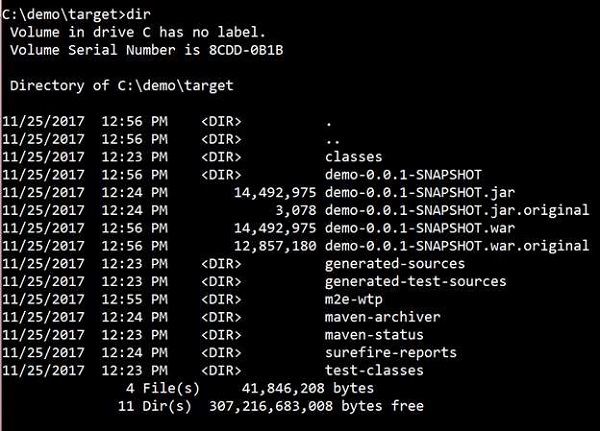
对于Maven,使用命令mvn package打包应用程序。 然后创建WAR文件,可以在目标目录中找到它,如下面给出的屏幕截图所示 -

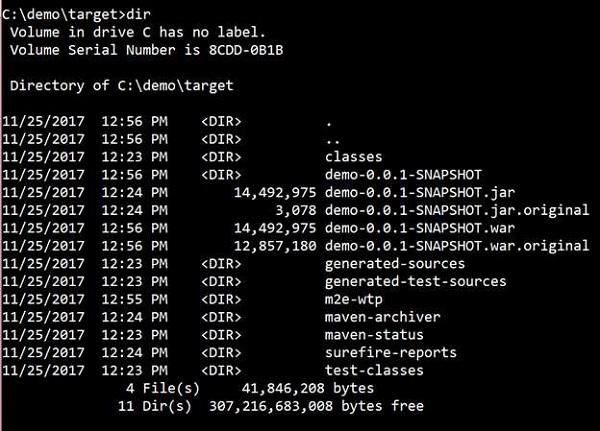
对于Gradle,使用命令gradle clean build打包应用程序。 然后,将创建WAR文件,可以在build/libs目录下找到它。观察此处给出的屏幕截图以便更好地理解 -

部署到Tomcat
现在,运行Tomcat服务器,并在webapps目录下部署WAR文件。
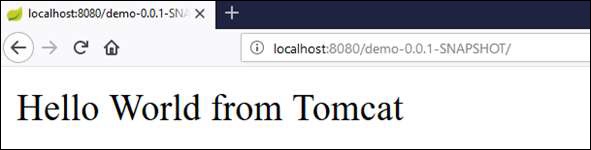
成功部署后,点击网页浏览器中的URL => http://localhost:8080/demo-0.0.1-SNAPSHOT/,观察输出结果如下图所示 -

完整代码如下:
文件:pom.xml -
<?xml version = "1.0" encoding = "UTF-8"?><project xmlns = "http://maven.apache.org/POM/4.0.0"
   xmlns:xsi = "http://www.w3.org/2001/XMLSchema-instance"

xsi:schemaLocation = "http://maven.apache.org/POM/4.0.0 http://maven.apache.org/xsd/maven-4.0.0.xsd"><modelVersion>4.0.0</modelVersion>

   <groupId>com.yiibai</groupId>
   <artifactId>demo</artifactId>
   <version>0.0.1-SNAPSHOT</version>
   <packaging>war</packaging>
   <name>demo</name>
   <description>Demo project for Spring Boot</description>

   <parent>
      <groupId>org.springframework.boot</groupId>
      <artifactId>spring-boot-starter-parent</artifactId>
      <version>1.5.8.RELEASE</version>
      <relativePath/> <!-- lookup parent from repository -->
   </parent>

   <properties>
      <project.build.sourceEncoding>UTF-8</project.build.sourceEncoding>
      <project.reporting.outputEncoding>UTF-8</project.reporting.outputEncoding>
      <java.version>1.8</java.version>
      <start-class>com.yiibai.demo.DemoApplication</start-class>
   </properties>

   <dependencies>
      <dependency>
         <groupId>org.springframework.boot</groupId>
         <artifactId>spring-boot-starter-web</artifactId>
      </dependency>
      <dependency>
         <groupId>org.springframework.boot</groupId>
         <artifactId>spring-boot-starter-test</artifactId>
         <scope>test</scope>
      </dependency>
   </dependencies>

   <build>
      <plugins>
         <plugin>
            <groupId>org.springframework.boot</groupId>
            <artifactId>spring-boot-maven-plugin</artifactId>
         </plugin>
      </plugins>
   </build></project>XML
文件:build.gradle
buildscript {
   ext {
      springBootVersion = '1.5.8.RELEASE'
   }
   repositories {
      mavenCentral()
   }
dependencies {
      classpath("org.springframework.boot:spring-boot-gradle-plugin:${springBootVersion}")
   }
}

apply plugin: 'java'
apply plugin: 'eclipse'
apply plugin: 'org.springframework.boot'
apply plugin: 'war'
apply plugin: 'application'

group = 'com.yiibai'
version = '0.0.1-SNAPSHOT'
sourceCompatibility = 1.8
mainClassName = "com.yiibai.demo.DemoApplication"

repositories {
   mavenCentral()
}
dependencies {
   compile('org.springframework.boot:spring-boot-starter-web')
   testCompile('org.springframework.boot:spring-boot-starter-test')
}Gradlepackage com.yiibai.demo;import org.springframework.boot.SpringApplication;import org.springframework.boot.autoconfigure.SpringBootApplication;import org.springframework.boot.builder.SpringApplicationBuilder;import org.springframework.boot.web.support.SpringBootServletInitializer;import org.springframework.web.bind.annotation.RequestMapping;import org.springframework.web.bind.annotation.RestController;@SpringBootApplication@RestControllerpublic class DemoApplication extends SpringBootServletInitializer { @Override protected SpringApplicationBuilder configure(SpringApplicationBuilder application) { return application.sources(DemoApplication.class); } public static void main(String[] args) { SpringApplication.run(DemoApplication.class, args); } @RequestMapping(value = "/") public String hello() { return "Hello World from Tomcat"; }}
原文出自【易百教程】,商业转载请联系作者获得授权,非商业转载请保留原文链接:https://www.yiibai.com/spring-boot/spring_boot_tomcat_deployment.html
转载请注明:谷谷点程序 » Spring Boot Tomcat部署